
Troubleshooting for Racing Wheel OVERDRIVE
Model: AB04-001U
Please try the following troubleshooting steps:
- Make sure your console system software is updated to the latest version.
-
Connect the Racing Wheel OVERDRIVE to a Windows PC and check for any available firmware updates.
If you have not installed the HORI Device Manager, please download it from the following link:
-
Follow the instructions in the HORI Device Manager to update the racing wheel firmware.
IMPORTANT: DO NOT DISCONNECT THE RACING WHEEL WHILE THE FIRMWARE IS UPDATING.
- Reset all racing wheel settings through the HORI Device Manager.
- Restart your console.
- Disconnect the racing wheel from the console and use a Xbox Controller to proceed to the console's main screen.
- Reconnect the Racing Wheel OVERDRIVE USB connector to the console, then press the Xbox button to sign in to the desired user profile.
-
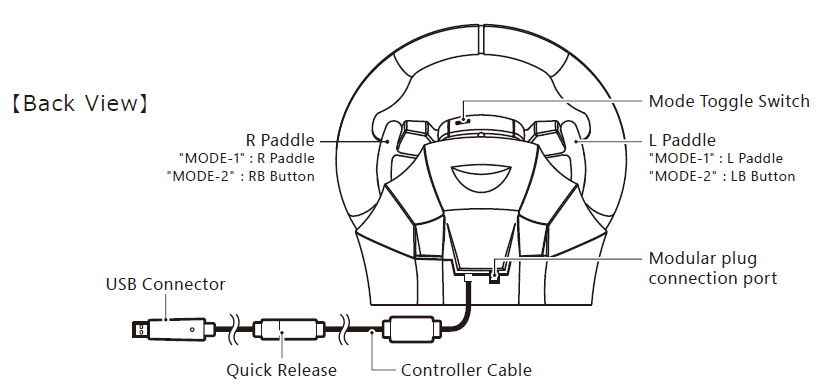
Make sure the toggle switches located above the center of the steering wheel are set to the appropriate positions.
For an Xbox Series X|S console, use:
MODE 1
If MODE 1 does not function correctly on Xbox Series X|S, try MODE 2.
When connecting the racing wheel to a Windows 10 PC, use MODE 2 as applicable.
Factory Reset
You may also try restoring the racing wheel's button assignments by using the HORI Device Manager for Xbox series X | S and selecting "Revert to Default" in all three categories: Wheel Button Mapping / Steering Setting / Pedal Setting
Note: If the Program LED remains illuminated, this may indicate that one or more buttons have been reassigned.
For instructions on assigning or reassigning buttons, please refer to the product instruction manual: