
Below are frequently asked questions and troubleshooting tips for users of the Mario Kart Racing Wheel Attachment for Nintendo Switch 2
Relevant products
NSX-052U Mario Kart Racing Wheel Attachment for Nintendo Switch 2 Mario
NSX-089U Mario Kart Racing Wheel Attachment for Nintendo Switch 2 Peach
NSX-102U Mario Kart Racing Wheel Attachment for Nintendo Switch 2 Yoshi
The SL/SR buttons don't respond after attaching the Joy-Con™
Ensure the Joy-Con™ is inserted correctly. Improper placement will prevent the SL/SR buttons from working.
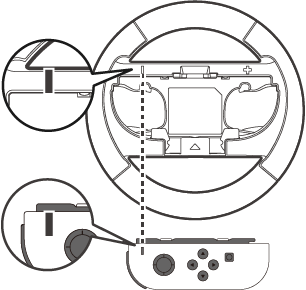
For Joy-Con™ (L)
Secure the alignment of the - buttons of the Joy-Con™ (L) and steering wheel.
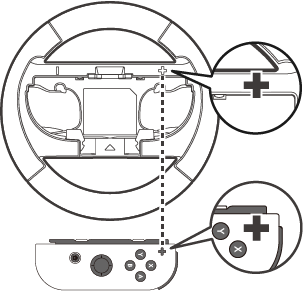
For Joy-Con™ (R)
Secure the alignment of the + buttons of the Joy-Con™ (R) and steering wheel.
I can’t use gyro controls in Mario Kart World.
Please check the in-game settings of Mario Kart World to ensure that the gyro function on your controller is turned ON.
How to turn on gyro function in Mario Kart World
1. Mario Kart World Character selection menu
2. In the vehicle selection screen, press the X button to open Controller Settings.
3. Turn on the gyro function
When the issue isn't resolved through troubleshooting
Please contact us through our customer support page if the issue persists.
Actual product may differ from image.
The manufacturer reserves the right to change the product design or specifications without notice.
© Nintendo. Nintendo Switch is a trademark of Nintendo.
All other trademarks are the property of their respective owners.